How the Treasury Crypto Wallet Dashboard Streamlines Web3 Interface Design
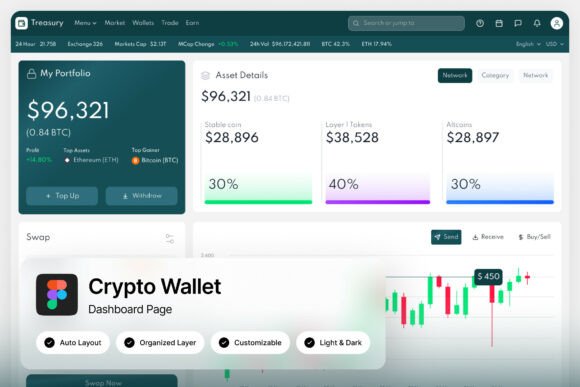
Building a cryptocurrency management platform or a Web3 application requires more than robust smart contracts and blockchain infrastructure. The interface layer presents complex data—portfolio balances, transaction histories, gas fees, and staking rewards—in a format that users can act on quickly. The Treasury Crypto Wallet Dashboard serves as a strategic starting point within the broader design and development process. This Figma template provides a high-fidelity foundation for teams looking to accelerate their UI workflow without sacrificing quality or scalability. By offering two meticulously crafted screens at 1440×1024 px, it bridges the gap between abstract planning and a tangible, modern product interface.
Role in the Broader Design Process
The dashboard template occupies a specific niche at the intersection of fintech and Web3 design. Unlike generic admin templates, it anticipates elements specific to cryptocurrency management: real-time price indicators, wallet connection states, token lists, and DeFi protocol interactions. Within a standard design sprint, this template fits naturally into the prototyping phase, allowing teams to bypass weeks of foundational layout work. It interacts directly with your brand assets, content strategy, and development framework by providing a pixel-perfect reference that designers and engineers can align around. For product managers, it reduces the ambiguity of user stories by providing a concrete visual context for features like multi-currency support or transaction approval workflows.
The template also serves as a communication tool across departments. Marketing teams can extract polished screens for landing pages or investor decks, while engineering teams can reference well-named layers to estimate implementation effort accurately. This interconnected utility makes the Treasury Crypto Wallet Dashboard more than a static asset—it becomes a shared language for the entire product organization.
Preparation Before the Project
Effective use of the Treasury Crypto Wallet Dashboard begins before you open the Figma file. Preparation involves auditing the template against your specific product requirements. The two included screens give you a complete admin dashboard view, but you need to map these to your user stories. Are you building a self-custody wallet, a custodial exchange interface, or a DeFi aggregator? Understanding this context helps you decide which components to customize heavily and which to adopt as-is.
Understanding the Two-Screen Structure
The 1440×1024 px resolution is an industry standard for desktop dashboard design. It balances dense data sets—such as transaction histories and portfolio breakdowns—with readability on standard monitors. By designing at this specific breakpoint, the template ensures your core tracking or trading interface feels native and uncluttered. Review the layer hierarchy to understand how the designer structured the sidebar, header, main content area, and data tables. This awareness prevents accidental restructuring later and helps you maintain the template’s internal consistency.
Light and Dark Mode Compatibility
One of the template’s practical strengths is the inclusion of a light and dark mode interface. For cryptocurrency applications, dark mode is not merely an aesthetic preference; it reduces eye strain during extended trading sessions and conserves battery life on mobile devices. Having both modes built into a single Figma file allows your team to prepare for user preferences without maintaining two separate design systems. During preparation, decide which mode will be your default and how you will handle the transition states between them. This planning phase ensures a smoother integration with your front-end framework’s theming system.
Integration with Tools and Teams
The Treasury Crypto Wallet Dashboard is a Figma file, which places it at the center of a modern design operations stack. It interacts seamlessly with collaboration tools, version control platforms, and handoff workflows used by professional teams.
- Design Systems and Tokens: You can extract color hex codes, spacing units, and typography scales from the template to populate a company-wide design system. This ensures uniformity across marketing websites, mobile apps, and the core dashboard.
- Developer Collaboration: Well-organized and grouped layers reduce friction during the developer handoff process. Engineers can inspect component padding, font weights, and overlay behaviors without needing constant clarification. This efficiency is especially valuable for remote teams working across time zones.
- User Testing Platforms: The high-fidelity screens allow for accurate user testing on platforms like Maze or UserTesting. You can prototype clickable flows that test wallet connection intuitiveness or transaction confirmation clarity before any code is written.
- Asset Management: The unique, stylish design elements can be exported as SVG or PNG assets for documentation, help center articles, or bug report templates. This extends the template’s utility beyond the initial design phase.
For entrepreneurs and small business owners building a digital asset tracking service, this template provides a crucial visualization tool. Instead of describing the platform’s potential to developers or investors verbally, you can present a sleek, realistic interface. This visual clarity reduces miscommunication and aligns the team around a concrete product vision before a single line of code is written.
Practical Implementation Workflow
Moving from the purchased template to a customized product interface requires a structured workflow. The assets included in the ZIP file—the Figma file, Help Guide PDF, and Font Links text file—are designed to support an efficient transition. Below is a recommended sequence based on real project execution.
- Resource Audit and File Setup: Extract the
.figfile, Help Guide PDF, and Font Links text file from the ZIP archive. Open the Figma file and review the layer organization to confirm the structure aligns with your project scope. The Help Guide PDF provides systematic documentation that is invaluable for onboarding new designers or developers later. - Brand Customization: Use the Font Links text file to quickly locate and implement the specified Google Fonts. Adjust heading and body typefaces to match your brand guidelines. Customize the color palette for both light and dark modes, ensuring sufficient contrast for financial data readability.
- Content Mapping and Data Configuration: Replace placeholder transaction data, portfolio values, and wallet addresses with your own metrics. The two-screen resolution naturally accommodates this information without requiring layout rework. Maintain the original spacing and typography hierarchy to preserve the pixel-perfect layout.
- Component Expansion: Use the existing styled elements—buttons, cards, chart frames—to build additional screens not included in the template. Because the layers are well named and grouped, you can duplicate and modify components with confidence, knowing the interaction patterns remain consistent.
- Developer Handoff: Export asset slices and use Figma’s inspection tools to provide developers with precise measurements. The organized layer structure means engineers can easily locate the padding values, color hex codes, and typography scales needed for implementation.
This workflow minimizes the friction between purchasing a template and deploying a production-ready interface. Freelancers and agencies serving Web3 clients can use this process to reduce initial dashboard setup time by 40 to 60 hours, reallocating that budget toward user research, custom animation, or advanced data visualization.
Quality Control and Long-Term Use
From a quality control perspective, the Treasury Crypto Wallet Dashboard establishes a high baseline. The pixel-perfect layout and modern typography eliminate the early-stage design debt that often plagues cryptocurrency platforms. Every button, card, and data table shares a unified design language, which builds user trust in the financial accuracy of the platform. A consistent interface signals reliability, which is critical when users are managing real assets.
Maintaining Consistency at Scale
After the initial launch, the template continues to serve as a reference for quality. When adding new features—such as a staking rewards tracker, an NFT gallery, or a cross-chain bridge interface—the existing layout structures and UI elements provide a reliable framework. The unique and stylish design ensures that new screens feel like natural extensions of the original product rather than disconnected additions.
For educators and bloggers creating content about Web3 design, this template serves as an excellent pedagogical tool. You can deconstruct the organized layers to teach students about information architecture in fintech, the importance of dark mode interfaces, or how to structure a dashboard for scalability. The free Google Fonts inclusion also makes it easy to swap typefaces for educational demonstrations without worrying about licensing fees.
Iterative Improvement
Long-term use of the template involves regular refinement based on user feedback and analytics. The two-screen foundation gives you a controlled scope for A/B testing. You can experiment with different card layouts, navigation placements, or chart types while relying on the template’s proven structural integrity. The well-documented layer names and groups make it easy for new team members to understand the file history and contribute effectively without breaking existing components.
Ultimately, the Treasury Crypto Wallet Dashboard is designed to integrate smoothly into the way professional teams already work. It respects the preparation phase by providing a clear starting point, supports active development through organized and customizable layers, and extends into long-term maintenance as a reliable source of design consistency. Whether you are a solo founder launching a Web3 startup or a product manager at an established blockchain platform, this template offers a practical, execution-focused path from concept to polished interface.