Movie Stream Application Mobile UI KIT: Design & Build Faster
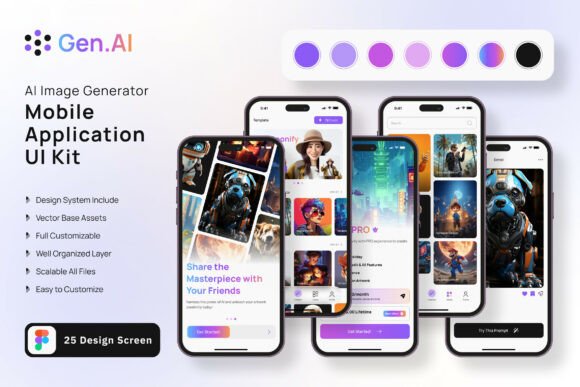
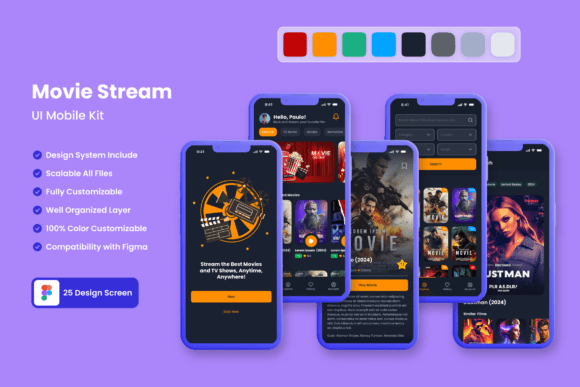
Building a mobile application from scratch takes time, technical skill, and a clear design vision. That process becomes significantly faster and more reliable when you start with a complete visual foundation. The Movie Stream Application Mobile UI KIT provides exactly that: a collection of 25 pixel-perfect screen designs that let you skip the blank canvas and jump straight into crafting a streaming experience. Whether you are a designer looking for a head start, a developer needing consistent components, or a product owner validating an idea, this kit offers a practical launchpad. It is built for Figma, fully editable, and includes over 80 UI elements, 100 scalable vector layers, and a free font. What makes it useful is not just the volume of assets, but the way they are organized to help you build a coherent mobile app quickly.
What Makes This UI Kit Valuable for Creative Work
A movie streaming app involves more than just a video player and a search bar. Users expect smooth navigation, curated content displays, user profiles, subscription options, and engaging onboarding flows. This kit covers all those core screens and many more. The templates are designed with a modern, clean aesthetic that works for both iOS and Android, and every element is fully layered and symbol-based. That means you can change colors, text, or icons across the entire set without editing each screen one by one.
The inclusion of 80 ready-to-use UI elements – buttons, cards, navigation bars, forms, and media controls – gives you a library of reusable building blocks. Instead of designing each interaction from scratch, you adapt what is already there. For anyone who has ever spent hours aligning buttons or resizing thumbnails, this alone saves days of effort. The vector layers are 100% scalable, so you can adjust the design to different screen sizes without losing quality. And because the kit is available for Figma, your entire team can collaborate on the same file, share feedback, and keep consistency from prototype to final build.
Customize for Niche Streaming Audiences
The base templates assume a general movie streaming service, but you can adapt the screens for niche audiences with minimal effort. For example, replace the generic movie cards with documentary covers, anime thumbnails, or short-form video posters. Adjust the color scheme to match a specific brand – a vintage film festival palette, a dark theme for horror content, or bright gradients for children’s programming. Each screen can be tailored while keeping the core navigation and layout intact. The kit’s structure supports rapid iteration: you change the visual skin without rebuilding the user flow.
Build a Prototype for a Subscription-Based Service
If you are testing a subscription model for a streaming app, the kit includes screens that show pricing tiers, account settings, and payment forms. You can quickly wire them together in Figma to simulate a full user journey – from sign-up to content browsing to purchase. This is especially useful for marketers and product managers who need to present a realistic prototype to stakeholders or investors. Because the templates are pixel-perfect, the prototype will look like a finished app, helping everyone focus on the user experience rather than placeholder screens.
Design a Multi-User Platform
Many modern streaming services support multiple profiles under one account. The kit provides user profile screens and account management layouts that you can extend. Add parental control options, watch history tabs, and personalized recommendations. The flexible component structure means you can duplicate and modify profile cards, avatar selectors, and settings toggles without breaking the overall design. For freelancers and agencies who build apps for clients, this kit becomes a reusable starting point that can be adapted for different streaming verticals – music, podcasts, or even educational video libraries.
Designers: Speed Up Your Workflow Without Sacrificing Quality
When you start a new project, you often spend the first two weeks just establishing a design system. This kit gives you that system immediately. You can focus on refining interactions, adding micro-animations, or testing alternative layouts for specific screens. The symbol objects and fully layered files make it easy to rearrange, hide, or add elements. If your client needs an extra onboarding step, you can pull a card from the existing flows and adjust the copy and imagery. The free icon vector set included in the kit covers standard actions like search, play, download, and share, so you are not hunting for external assets.
Developers: Bridge Design and Code More Smoothly
A developer who receives a Figma file built with this kit can extract exact measurements, color codes, and spacing values. The consistent naming of layers and symbols helps translate designs into CSS, SwiftUI, or Jetpack Compose with less guesswork. Because the templates are pixel-perfect, the developer knows the intended look at any screen size. This reduces back-and-forth with the designer during implementation. The kit also encourages a component-driven approach: you map each symbol to a code component, resulting in a maintainable frontend.
Entrepreneurs and Small Business Owners: Validate an Idea Without a Large Investment
If you have an idea for a local movie streaming service, a platform for independent filmmakers, or a learning app that uses video content, you can use this kit to create a convincing prototype without hiring a full design team. The 25 templates give you most of the screens you would need for a realistic demo. You can customize the app name, add placeholder content, and present it to potential users or investors. The ability to edit the design in Figma means you can also make changes quickly based on feedback, without redoing everything. For a small startup, this shortens the time from idea to feedback loop significantly.
Practical Inspiration: Realistic Project Ideas Using the Kit
- Short Film Festival App: Replace the movie thumbnails with festival posters, add a schedule screen, and create a voting or rating feature using existing list templates.
- Video Tutorial Platform: Adapt the player screen to show a progress bar and chapter markers. Use the profile screens for instructor bios and the subscription screens for premium course access.
- Movie Review and Rating Community: Combine the content browsing screens with a social feed component. Add comments and user ratings using modifiable card elements.
- Kids’ Streaming Service: Change the color palette to bright primary colors, enlarge thumbnails, and simplify the navigation bar. The flexible typography lets you switch to a playful font easily.
- Live Event Streaming App: Focus on the onboarding and quick-registration screens. Use the templates to create a “now live” section with countdown timers and ticket purchase flows.
Recommendations for Customization and Consistency
To get the most out of this kit, start by exploring every screen and UI element it includes. Understand the structure of the symbols and how text styles are applied. Then, before making any visual changes, decide on your core brand guidelines – primary and secondary colors, typography scale, and icon style. Because the kit is fully editable, you can update the main color style in Figma and see it propagate across all screens. This keeps your design cohesive from the first screen to the last.
When adding new screens or elements, try to reuse existing components rather than creating new ones. This maintains consistency and saves time. For example, if you need a new settings option, duplicate a settings row and change the text and icon. The same goes for buttons, navigation bars, and cards. Using the existing symbol library ensures that spacing, corner radii, and shadows remain uniform throughout the app.
It is also wise to keep your Figma file organized by grouping screens into flows – onboarding, home, browse, player, profile, and settings. The kit already groups many screens logically, but you can adjust the naming to match your project’s information architecture. Clear labeling helps both you and anyone else who works on the file later.
Keeping Your Results Clear, Effective, and Audience-Friendly
A mobile app design is only as good as the experience it enables. While the templates look polished, the real test is how easy the interface is to navigate. When customizing the kit, consider the user journey for your target audience. For a general movie app, keep the main navigation simple – home, search, library, and profile. For a more specialized app, you might shift the navigation to highlight categories like “trending,” “genre,” or “my list.” Use the kit’s vector icons sparingly and ensure each icon’s meaning is immediately clear.
Pay attention to typography hierarchy. The free font included in the kit works well for headings and body text, but you can swap it for another free font that better matches your brand. Maintain clear contrast between text and background, especially for movie descriptions and ratings. The kit’s dark theme templates are particularly helpful for streaming apps, as they reduce eye strain during video browsing at night.
Finally, remember that the images shown in the preview are placeholders. You will need to replace them with actual content – movie posters, screenshots, or graphics – that fit your app’s theme. This is where the layer structure shines: you can drop in new images without disturbing the layout or the overlay elements like play buttons and badges. Doing this carefully will make your app feel unique even though it started from a template.
The Movie Stream Application Mobile UI KIT is not just a collection of templates; it is a tool that respects the boundaries between design, development, and strategy. Whether you are building a prototype for a pitch, an MVP for a test launch, or a full‑scale app for a growing user base, having 25 well‑crafted screens at your fingertips changes the pace of your work. You spend less time on repetitive UI decisions and more time on the unique features and content that will define your streaming app. With full editability in Figma, a generous set of elements, and a thoughtful structure, this kit delivers both inspiration and practical results for anyone ready to bring a movie streaming idea to life.