How the Ai Image Generator App Mobile UI KIT Helps Build Better Mobile Applications
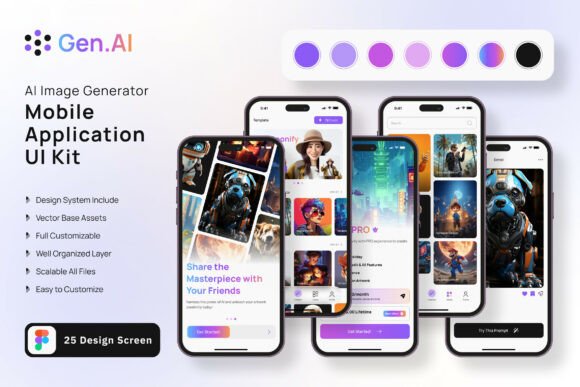
Building a mobile application from scratch involves many decisions, and the visual interface is one of the most time-consuming parts to get right. The Ai Image Generator App Mobile UI KIT is a collection of 25 high-quality templates designed specifically for constructing mobile applications in the image generation space. It provides a structured starting point for designers and developers who want to move quickly without sacrificing quality. Instead of beginning with a blank canvas, you get a set of pre-built screens that reflect current design patterns used in popular AI-powered image apps.
This article examines what makes this UI kit distinct, how it compares with other approaches to mobile app design, its strengths and limitations, and the situations where it fits best. Whether you are evaluating templates for a client project, a startup idea, or a personal experiment, understanding what this kit offers and where it might fall short can help you decide if it suits your needs.
What the Ai Image Generator App Mobile UI KIT Offers
At its core, this UI kit is a Figma-based resource that includes 25 pixel-perfect screen designs. These screens cover common workflows found in AI image generator applications, such as prompt input, gallery browsing, image detail views, settings panels, and account management. The kit also provides 80 individual UI elements and 100 vector layers, giving you ample building blocks to assemble custom screens beyond the included templates.
One practical advantage is that all elements are fully layered and organized with symbol objects. This means you can quickly locate a button, text field, or navigation bar and adjust its properties without digging through nested groups. The inclusion of free icons and a free font reduces the need to source additional assets, which streamlines the early design phase. The color style is also easy to change, so if your brand uses a specific palette, you can apply it across all screens with minimal effort.
It is worth noting that the images shown in previews are for demonstration only and are not included in the download files. You will need to supply your own sample images or placeholder graphics during development.
How This Kit Compares with Other Design Approaches
When building a mobile app interface, you generally have a few options: custom design from scratch, using a general-purpose UI kit, or using a specialized kit tailored to a specific app category like AI image generation. The Ai Image Generator App Mobile UI KIT falls into the specialized category, which brings both benefits and tradeoffs compared to more generic alternatives.
A general UI kit might include hundreds of components like buttons, cards, forms, and navigation bars, but it rarely provides complete screens designed for a particular workflow. You would need to assemble those components yourself and figure out the user flow. With this specialized kit, the screens are already laid out with the typical user journey of an AI image app in mind. For example, you get screens for entering text prompts, viewing generated results, and managing a history of creations. This saves time because you are not inventing the layout from scratch.
On the other hand, a general kit might offer more flexibility if your app idea diverges significantly from the standard image generator pattern. If your application includes unusual features like team collaboration, advanced image editing layers, or e-commerce integration for prints, you may find the specialized screens less adaptable. In that case, a modular general kit or a fully custom design could be a better match.
Strengths and Practical Benefits
The most obvious strength of this kit is the time it saves. With 25 ready-made screens, you can establish a consistent visual language across your app quickly. Consistency is important because users expect familiar navigation and interaction patterns, especially in utility apps like image generators where the workflow is relatively linear: input a prompt, view results, select and save, adjust settings, and manage a gallery.
Another practical benefit is the pixel-perfect nature of the designs. Screens are built to standard mobile resolutions, which reduces the guesswork around spacing, alignment, and responsiveness. This is particularly helpful if you are not a seasoned UI designer or if you want to hand off the design to a developer who prefers precise specifications.
The inclusion of 80 UI elements means you are not limited to the 25 screens. You can mix and match components to create additional views. For instance, if you need a tutorial screen or a feedback form, you can likely assemble it from existing elements rather than designing it from nothing. The vector layers are scalable, so resizing elements for different screen sizes or orientations remains clean and crisp.
The kit is fully editable in Figma, which is widely used for collaborative design work. Team members can comment, modify, and maintain a single source of truth. The symbol objects ensure that changes to a master component, like a primary button, update automatically across all instances. This makes iterative refinement much faster.
Tradeoffs and Limitations to Consider
No single UI kit solves every problem, and this one has limitations worth weighing. First, the 25 screens are designed around a fairly standard AI image generator workflow. If your app includes unconventional features, such as a marketplace for user-generated prompts, a social feed for sharing creations, or a subscription management flow, you may need to create those screens from scratch or adapt existing ones heavily. The kit provides a strong foundation, but it is not a complete blueprint for every possible variation of an image generator app.
Second, the free font and free icon set may not match the typographic or visual identity you have in mind. While swapping fonts is straightforward in Figma, finding a suitable replacement that maintains the layout and spacing can take extra effort. Similarly, the included icons cover common actions—like download, share, delete, and settings—but they may not include more niche symbols, such as advanced filter controls or AI model selection badges.
Another limitation is that the kit focuses solely on the visual UI layer. It does not include design system documentation, code exports, or developer handoff annotations beyond what Figma provides natively. If your team relies on detailed specs for implementation, you may need to add notes or use a plugin to generate style guides.
Finally, because the kit is specialized for AI image generator apps, its audience is narrower. If you are building a different type of AI tool, such as a text classifier or a voice assistant, many of the screens would need substantial reworking. In that scenario, a more general mobile UI kit might serve you better.
When the Ai Image Generator App Mobile UI KIT is the Right Choice
This kit is a strong fit in several scenarios. If you are prototyping an AI image generator app for a pitch, hackathon, or early user testing, the pre-built screens allow you to present a polished interface within days rather than weeks. Investors and testers respond better to realistic mockups than to wireframes or raw component libraries.
If you are a solo founder or a small team without a dedicated designer, using a specialized kit reduces the risk of creating an interface that looks amateurish or inconsistent. The kit follows established mobile design conventions, so your app will feel familiar to users who have used other image generation tools.
For freelance designers or agencies, this kit can serve as a starting point for client projects in the AI creative space. You can customize the screens to match the client's branding and extend them with additional features as needed. The time saved on foundational design work can be reinvested into more complex customizations or user research.
Another good use case is for learning. If you are new to mobile UI design and want to understand how a complete app is structured, studying the 25 screens gives you insight into navigation patterns, information hierarchy, and component usage. You can deconstruct each screen to see how elements are arranged and layered.
When You Might Need Another Option
There are also situations where a different approach makes more sense. If your app requires a highly unique user experience that deviates significantly from the standard AI image generator flow, the constraints of a pre-built kit may feel limiting. Custom design gives you complete freedom to experiment with novel interactions, even if it takes longer.
If you are building a cross-platform app using a framework like React Native or Flutter, a Figma-based UI kit provides visual guidance but not direct code components. You would still need to translate the designs into your chosen framework. Some UI kits now include code snippets or design system files that bridge this gap, but this particular kit does not offer that integration.
For teams that require a highly accessible design from the outset, any visual UI kit should be audited for contrast, touch target sizes, and screen reader compatibility. The kit likely follows standard accessibility practices, but you should verify this against your specific requirements, such as WCAG compliance levels.
Practical Considerations Before You Download
Before committing to this kit, consider a few practical factors. Check your team's familiarity with Figma. If everyone is comfortable with the tool, the fully layered structure and symbol objects will be intuitive. If your team uses Sketch or Adobe XD, you would need to convert the files, which may introduce inconsistencies.
Think about the scale of your project. For a simple MVP with a limited feature set, 25 screens may cover 80 to 90 percent of what you need. For a more complex application with multiple user roles, advanced settings, or third-party integrations, you may need to supplement the kit significantly.
Also consider the long-term maintenance of the design. As your app evolves, you will likely add new features that require new screens. The kit's component library makes it easier to extend the visual language, but you are ultimately responsible for keeping the design consistent as you grow beyond the original templates.
Making an Informed Decision
The Ai Image Generator App Mobile UI KIT is a practical resource for anyone building an AI image generator mobile app. Its 25 screens, 80 UI elements, and 100 vector layers provide a solid foundation that can reduce design time significantly. The fact that it is fully editable in Figma, uses symbol objects, and allows easy color changes makes it flexible enough to adapt to different brand identities.
That said, it is not a one-size-fits-all solution. Its specialized nature means it works best for apps that follow the standard image generation workflow. If your app includes unconventional features or targets a different niche, you may need to invest additional time in customization or look for a different starting point.
For most small to medium-sized projects in the AI creative space, this kit strikes a reasonable balance between speed and quality. It gives you a head start without locking you into a rigid design. As long as you are prepared to supply your own images, extend the screens as needed, and handle the development handoff yourself, it can be a valuable addition to your design toolkit.
Take the time to review the 25 screens against your feature list. Identify which ones you can use as-is, which ones need minor adjustments, and which ones you will need to build from scratch. This gap analysis will tell you whether the kit covers enough ground to justify the investment. In many cases, even covering half the screens is a meaningful head start that lets you focus more on user experience and less on repetitive layout work.