GearVault: E-Commerce Retro Tech Mobile UI Kit for the Modern Collector
Building a digital storefront in a niche market requires more than just listing products. You need an environment that communicates the values, the aesthetics, and the tactile experience of what you're selling. This is where GearVault - E-commerce Retro Tech Mobile enters the picture. Designed as a high-end mobile UI kit, it merges analog nostalgia with digital precision, giving you a foundation that feels both curated and deliberate. For entrepreneurs, creators, and small business owners who operate in premium gadget shops, lifestyle commerce, or any collector-driven marketplace, this kit offers a strategic starting point that goes beyond surface-level design.
What GearVault Brings to Your Digital Storefront
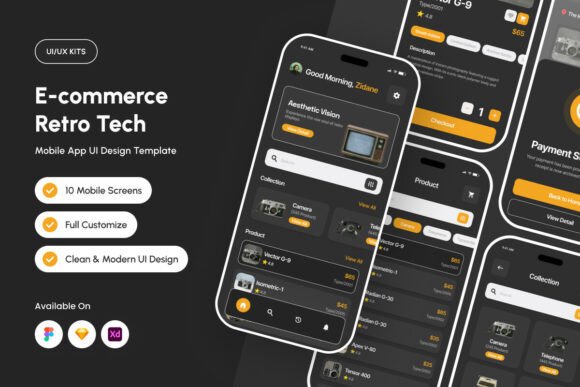
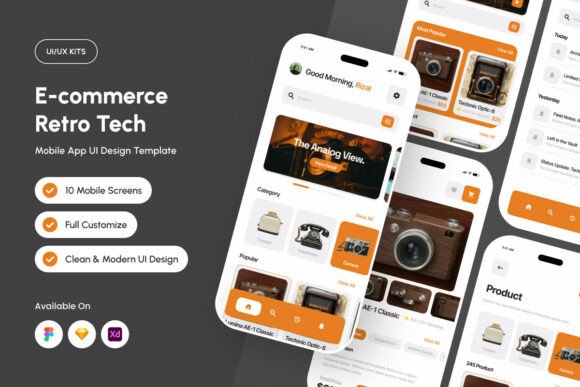
At its core, GearVault is a UI design template built for Figma, Sketch, and Adobe XD. It features a raw industrial aesthetic supported by a clean, minimalist layout. Signature Industrial Orange accents paired with a warm neutral palette create a tactile, mechanical feel that immediately distinguishes your mobile interface from generic e-commerce templates. The kit also leverages technical line iconography and a hybrid typography approach that blends modern grotesk with retro-pixel styles. This combination is not arbitrary; it deliberately evokes the look and feel of classic hardware, which can be especially effective if your audience values craftsmanship, heritage, and authenticity.
Rather than starting from a blank canvas, you get a professionally structured screen layout with well-organized layers, global text and color styles, and fully customizable components. This means less time on repetitive design decisions and more time focusing on product curation, customer experience, and business strategy. For a publisher, blogger, or small business owner who may not have a dedicated design team, this structure reduces friction and accelerates time to market.
Strategic Value for Niche Market Positioning
When you operate in a specialized segment—whether it's retro tech, vintage audio, mechanical keyboards, or limited-edition gadgets—your brand's visual language must signal trust and expertise. GearVault - E-commerce Retro Tech Mobile helps you achieve that by providing a cohesive design system that feels intentional. The warm neutral palette with industrial accents projects a sense of durability and precision, which can reinforce the quality perception of the products you sell. This is not about chasing trends; it's about aligning your digital presence with the physical and emotional experience your customers expect.
For entrepreneurs and decision-makers, this alignment can support long-term brand building. A consistent, well-crafted interface reduces cognitive friction for shoppers, making it easier for them to browse, compare, and commit to a purchase. In practical terms, this can translate into higher conversion rates and improved customer retention, especially when your audience includes collectors who value attention to detail.
When to Use GearVault and How to Approach It
GearVault is particularly useful if you are launching or redesigning a mobile-first e-commerce experience for a niche tech or lifestyle audience. Because the kit is fully compatible with Figma, Sketch, and Adobe XD, you can integrate it into your existing workflow without needing to learn new tools. The included files—.Fig, .Sketch, .Xd, and a readme—make setup straightforward.
Before diving into customization, take time to define your brand's core messaging and visual identity. While the kit provides a strong foundation, its effectiveness depends on how well you adapt it to your specific product catalog and customer expectations. Start by reviewing the global text and color styles. These are designed for consistency, so modifying them thoughtfully will ensure your storefront remains cohesive across all screens. Pay attention to the typography: the blend of modern grotesk and retro-pixel fonts can be a powerful differentiator, but it should feel natural within your product context rather than forced.
Practical Examples of Intentional Use
- Collector-focused gadget shop: If you sell limited-run mechanical keyboards, vintage-inspired audio equipment, or retro gaming accessories, GearVault's industrial aesthetic directly complements your inventory. Use the warm neutral backgrounds to let product photography stand out, while Industrial Orange accents can highlight calls to action or limited-stock alerts.
- Lifestyle commerce app: For a brand that sells lifestyle products with a nostalgic angle—like analog watches, leather goods, or curated tech accessories—the kit's tactile design language reinforces the craftsmanship narrative. The technical line icons can replace generic icons, creating a more cohesive visual story.
- Subscription box or membership store: If you run a curated subscription service for tech enthusiasts, the structured layout and organized layers make it easier to design repeatable product cards, membership tiers, and onboarding flows that feel premium yet approachable.
In each case, the goal is not to simply apply the template as-is, but to use it as a strategic scaffold. Customize the components to reflect your unique inventory, pricing strategy, and customer journey. The kit gives you a head start, but your product knowledge and market insight determine the finish line.
Planning Considerations Before You Commit
While GearVault is a well-crafted tool, it's important to consider a few factors before relying on it for your entire mobile experience. First, the images shown in the preview are for demonstration only and are not included in the final download. You will need to source your own product photography and visual assets. If your product images vary in quality or style, the consistency of the UI may be compromised. Plan your photography or illustration approach in parallel with your design work.
Second, this is a UI/UX design template, not a fully functional app or website. It provides the visual blueprint, but implementation requires development work or integration with a platform that supports custom design exports. Be clear about your technical resources and timeline. If you are a solo creator or a small business owner without direct access to a developer, consider how you will translate the design into a live mobile experience. Some no-code tools may accommodate custom UI kits, but others may require additional effort.
Potential Risks of Using a Design Template Without Clear Goals
One of the most common missteps when adopting any UI kit is treating it as a final product rather than a starting point. If you apply GearVault without first defining your brand voice, customer journey, and conversion goals, the result may look polished but feel disconnected from your actual business needs. For example, using the retro-pixel typography extensively might appeal to a niche audience, but if your primary customer base skews older or less design-literate, it could create readability issues. Similarly, the industrial aesthetic may not suit every product category. A store selling minimalist, modern tech gadgets might find the visual language too heavy.
Another risk is over-customization without maintaining the underlying design system's integrity. The global styles and organized layers are there to ensure consistency. If you start making ad-hoc changes to colors, spacing, or typography without a clear rationale, you can quickly erode the coherence that makes the kit valuable. This can lead to a fragmented user experience that undermines trust and reduces conversion potential.
Long-Term Value and Strategic Positioning
When used thoughtfully, GearVault - E-commerce Retro Tech Mobile can become a cornerstone of your brand's digital identity. Its unique blend of analog nostalgia and digital precision is not something you can easily replicate with generic templates. For entrepreneurs, marketers, and creators who want to differentiate in a crowded marketplace, this kit offers a distinct visual language that resonates with collectors and enthusiasts who appreciate craftsmanship.
Over time, as your product catalog evolves and your customer base grows, the design system's flexibility allows you to iterate without starting from scratch. The well-organized layers and global styles make updates more efficient, whether you are adding new product categories, launching seasonal campaigns, or refining your checkout flow. This scalability is particularly valuable for small business owners and publishers who need to balance creative output with operational demands.
Decision-Making Guidance for the Modern Creator
If you are considering GearVault for your mobile storefront, take a moment to assess your current stage of business. Are you in the early planning phase, needing a strong visual direction to attract early adopters and investors? Or are you an established brand looking to refresh your mobile experience to better reflect your heritage and quality? The kit can serve both scenarios, but your approach will differ. In the early stages, leverage the template to create a polished prototype that communicates your vision. For an existing brand, use it to audit your current interface and identify where the industrial aesthetic can enhance your storytelling.
Additionally, think about your team's design maturity. If you or your collaborators are experienced with Figma, Sketch, or Adobe XD, the customization process will be smoother. If not, consider investing a small amount of time in learning the basics of layer management and style editing before diving in. This upfront investment pays dividends in the quality of the final output and your ability to maintain the design over time.
Final Thoughts on Using GearVault Intentionally
GearVault is more than a set of screens; it is a design philosophy applied to mobile e-commerce. By intentionally adapting its raw industrial aesthetic, warm neutral palette, and unique typography to your specific products and audience, you create a storefront that feels like a classic piece of hardware—something worth exploring, owning, and returning to. For entrepreneurs, bloggers, and small business owners operating in niche tech and lifestyle markets, this kit provides a strategic advantage that goes beyond aesthetics. It supports better planning, clearer positioning, and a more cohesive customer experience.
The key is to approach it not as a shortcut, but as a foundation. Define your goals first. Understand your customers. Then let GearVault amplify your message through design that feels deliberate, refined, and deeply aligned with the products you sell. Done well, your mobile storefront becomes more than a sales channel—it becomes an extension of the lifestyle you represent.