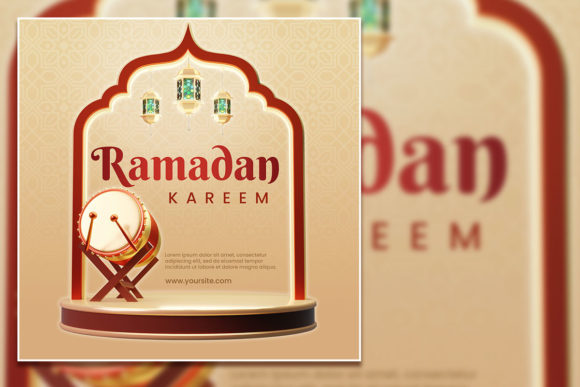
Modern Ramadan Kareem Social Media Post & Flyer
Ramadan is a time of reflection, community, and celebration. For brands, creators, and small businesses, it's also a moment to connect with audiences in a meaningful way. A Modern Ramadan Kareem Social Media Post combined with a fully editable Ramadan flyer template gives you a head start on creating polished, on-brand visuals without needing advanced design skills. These templates are built for speed and flexibility, letting you focus on the message while the layout does the heavy lifting.
What makes these templates interesting is how they bridge tradition and contemporary style. The 2000×2000 pixel square format works seamlessly across Instagram, Facebook, LinkedIn, and even print. At 300 dpi in RGB color mode, you get crisp, vibrant results whether you're posting digitally or printing flyers for an iftar event. The PSD file comes with organized layers, so you can toggle elements on and off, swap colors, and replace text with just a few clicks. Everything is structured for easy editing in Adobe Photoshop.
Let's explore how you can use these templates creatively, adapt them for different goals, and keep your designs clear and consistent.
Daily Greeting Series
Run a 30-day series of Ramadan Kareem social media posts using the template as your base. Change the background color or overlay pattern each week to signal a new theme. For example, week one could focus on gratitude with warm gold tones, week two on charity with deep green, and week three on family with soft blue. The editable text layer lets you update the greeting daily without rebuilding the design from scratch. Keep the photo slot consistent with your own imagery – a lantern, a date plate, or a moonlit sky – to build visual continuity.
Event Promotion
Mosques, community centers, and restaurants often host iftar dinners, Quran study circles, or charity drives during Ramadan. Use the Ramadan flyer template to promote these events. Replace the sample photo with a shot of the venue or a dish from the menu. Edit the headline to include the event name, date, time, and location. Since the PSD is fully layered, you can duplicate the file and create variations for different events while keeping the same brand feel. Add a call-to-action like "Reserve your spot" or "Donate now" in a bold font.
Product Launches and Promotions
Businesses selling Ramadan-themed products – from gift baskets to modest fashion to home décor – can adapt the template as a product showcase. Swap the placeholder image with a professional product photo. Use the editable text area to highlight key selling points or a limited-time discount. Because the template is 2000×2000 pixels, it works well for both Instagram posts and printed flyers to display in-store or at community events. Keep the design clean; avoid overcrowding the layout with too many text blocks.
For Social Media Managers
Speed matters when you're managing multiple accounts. The organized layers in the PSD file let you quickly change text, swap images, and adjust colors. Save the file as a template master, then duplicate it for each platform. For Instagram Stories, crop the design to 9:16 ratio by rearranging the layers – move the headline to the top and the image to the center. For LinkedIn, add a more professional tone to the text, focusing on community values or corporate social responsibility initiatives. The RGB color mode ensures accurate colors across digital screens.
For Small Business Owners
You don't need a design team to look professional. The fully editable Ramadan flyer template gives you a ready-made layout that you can personalize with your own branding. Change the font using the included link (download instructions are in the help file) to match your brand identity. Update the contact information, website URL, and logo. The JPG version is useful for quick previews or for sharing with printing services that don't accept PSD files. Print at 300 dpi for sharp, high-quality results.
For Freelancers and Designers
Use the template as a starting point for client projects. The layered structure lets you experiment with different color palettes, typography combinations, and photo placements without starting from scratch. You can create three to five variations of a Modern Ramadan Kareem Social Media Post for a client to choose from, then refine the chosen direction. The instant download means you can begin working immediately after purchase. Keep the original PSD as a backup and work on copies to avoid accidental overwrites.
Maintain Visual Consistency
Stick to a limited color palette – two to three main colors plus a neutral background. The template uses a clean, modern aesthetic that works well with muted golds, deep blues, and soft creams. Avoid using too many font styles; one display font for headlines and one readable font for body text is enough. The text tool in Photoshop makes it easy to select and replace text without disturbing other layers. If you change the font, ensure it supports Arabic or Urdu characters if your content includes them.
Prioritize Readability
Ramadan posts often include quotes, prayers, or event details. Make sure the text contrasts well with the background. If the template uses a light background, use dark text. If you switch to a dark overlay, choose light or white text. The 2000×2000 pixel resolution gives you enough space to keep text large enough for mobile screens. Test your design on a phone before posting to ensure nothing gets cropped or becomes too small to read.
Keep the Focus on the Message
A busy design distracts from the core message. Use the photo area to feature a single strong image – a crescent moon, a traditional lantern, or a silhouette of a person praying. Let the design breathe by leaving some negative space. The organized layers help you decide what to include and what to hide. If a layer doesn't add value, turn it off. The goal is a clear, respectful, and visually appealing post that resonates with your audience.
Plan for Series or Campaigns
If you're posting multiple times during Ramadan, create a content calendar and batch-produce designs using the template. Change the photo and text for each post while keeping the same background and layout. This builds recognition and saves time. For example, post a daily dua (prayer) every evening, using the template as a consistent frame. Audiences will start looking for your post as part of their evening routine. The editable PSD makes batching fast – open the file, update the text and image, save as a new file, and repeat.
Real-World Examples and Inspiration
A local Islamic bookstore used a similar Ramadan flyer template to promote their "30 Days, 30 Books" campaign. Each day, they swapped the photo to show a different book cover and updated the text to include a short review. The consistent layout helped their followers quickly identify the posts in their feeds. Engagement increased because the audience knew what to expect and looked forward to the daily recommendation.
A community kitchen promoted their iftar distribution using the template. They replaced the stock photo with a real image of volunteers packing meals. The headline read "Feed the Fast" with the date and location. The flyer was printed and posted at local grocery stores, as well as shared on social media. The organizers appreciated that the template was fully editable – they could adjust the text when the location changed and update the photo each week to show different volunteer teams.
A fashion blogger used the Modern Ramadan Kareem Social Media Post template to showcase her modest wear collection. She replaced the background color with a soft pastel to match her brand and used the photo slot to feature herself wearing a new outfit each week. The clean layout kept the focus on the clothing, while the editable text area allowed her to include styling tips and discount codes. The series performed well on Instagram, with followers saving the posts for outfit inspiration.
Recommendations for Getting Started
Download the PSD file and open it in Adobe Photoshop. Take a few minutes to explore the layers panel – rename layers if it helps you stay organized. Start by replacing the placeholder photo with your own image. Use a high-resolution photo that aligns with the mood of your message. Next, update the headline and body text using the text tool. The font download link included in the help file gives you access to the exact typeface used in the preview, but you can use any font you prefer.
Save your work incrementally. Keep the original template untouched and work on a copy named something like "Ramadan_Post_Week1.psd". When you're happy with the design, export a JPG or PNG for social media. For print, save a PDF or use the included JPG at full resolution. The 300 dpi setting ensures your printed flyers look sharp and professional.
If you're new to Photoshop, the template is a forgiving learning tool. The organized layers mean you can experiment without breaking the layout. Change colors, move elements, or try different photo placements. Each edit is reversible as long as you work on a copy. The included help file provides guidance if you run into trouble.
Whether you're promoting an event, launching a product, or simply sharing daily Ramadan greetings, a Modern Ramadan Kareem Social Media Post and fully editable Ramadan flyer template give you a reliable foundation. The combination of instant download, organized PSD layers, and flexible design makes it easy to create professional content that resonates with your audience. Focus on the message, keep the design clean, and let the template handle the rest.
Ramadan is a time of generosity and connection. Your content should reflect that spirit. With the right template, you spend less time on layout and more time on what matters – engaging your community, sharing value, and celebrating the month with authenticity and creativity.