Medical Health Care Social Media: Templates That Work
Creating social media content for a medical or health care practice often feels like a race against time. Between patient appointments, administrative tasks, and staying current with industry updates, finding hours to design polished posts is nearly impossible. That is where a dedicated set of Medical Health Care Social Media Post templates can change how you approach your online presence. These ready‑to‑use files let you produce consistent, professional graphics without needing deep design skills—just the basics of Adobe Illustrator.
What This Template Set Offers
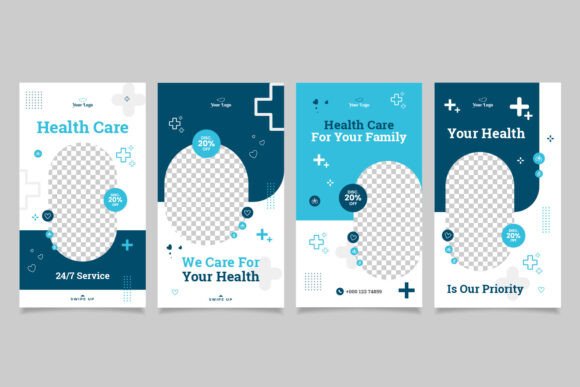
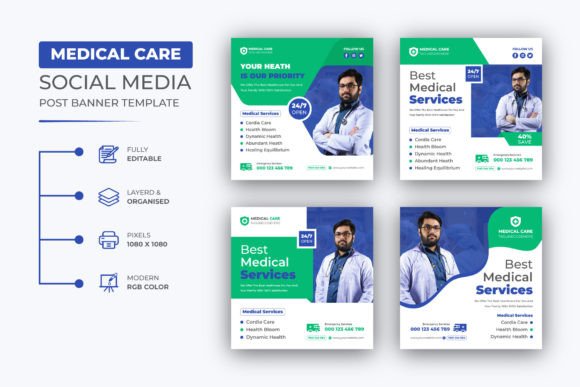
The package includes four high‑resolution AI and EPS files, each sized at 1080x1080 pixels in RGB color mode. Designed at 72 DPI, they are optimized for digital screens and social platforms. The files are fully customizable: you can adjust text, colors, images, and layout elements as long as you have a working knowledge of Illustrator. A help guide is included, and a free font download link is provided inside the main file, so you do not have to hunt for compatible typefaces.
The templates are created with a clean, professional aesthetic that suits a wide range of medical and health care businesses. Whether you run a dental clinic, a physiotherapy center, a wellness coaching practice, a pharmacy, or a telehealth service, these designs can be adapted to reflect your brand identity.
Why a Structured Social Media Post Matters for Health Care
Health care communication requires clarity and trust. A well‑designed post does more than catch the eye—it signals professionalism and attention to detail. When patients or clients see consistent branding across your social media, they are more likely to perceive your practice as reliable and organized. Templates remove the guesswork from each post, ensuring that your marketing materials maintain a coherent look even when you post about different topics such as health tips, service announcements, or patient education.
Saving Time Without Sacrificing Quality
Designing a single post from scratch can take anywhere from thirty minutes to over an hour, especially when you factor in choosing colors, arranging elements, and ensuring the final image fits platform dimensions. With a template, you can reuse the same structure repeatedly, only swapping out text and images. The easy‑edit nature of these files means you can create multiple posts in a fraction of the time—ideal for busy practitioners and small business owners who wear many hats.
For a dentist’s office, for example, posting a weekly oral health tip becomes a five‑minute task. Open the template, change the text, drop in a relevant photo, and export. The result looks just as professional as a custom‑designed graphic, yet it required minimal effort.
Consistency Builds Recognition
Brand recognition grows when audiences repeatedly see familiar colors, fonts, and layout styles. By using the same base design across posts, you reinforce your practice’s visual identity. Over time, followers will associate that look with your brand, making it easier for them to remember you when they need medical advice or services.
The customizable nature of the templates lets you set your own brand colors and logo placement. Once you update the master file, every future post automatically matches your established guidelines. This is especially valuable if you manage multiple social media accounts or collaborate with a marketing team.
Realistic Use Cases for Medical and Health Care Professionals
The templates are versatile enough to cover many common content needs.
- Health tips and seasonal advice: Share quick wellness reminders, flu prevention steps, or allergy season guidance. A clean, text‑driven template works well for these posts.
- Service or treatment highlights: Introduce new services like telehealth consultations, laser therapy, or nutritional counseling. You can feature an image of the relevant equipment or a welcoming photo of your team.
- Patient testimonials or success stories: With permission, share a short quote from a satisfied patient. Pair it with a warm background color and your clinic logo to maintain privacy while building trust.
- Event or promotion announcements: Promote free health screenings, open houses, or discounted check‑ups. The templates can be edited to include dates, times, and call‑to‑action buttons.
- Educational content: Break down complex medical terms into digestible bullet points. The structured layout keeps information clear and easy to read on mobile screens.
For wellness coaches or therapists, the same templates can be used for motivational posts, appointment reminders, or mental health awareness content. The flexibility means you are not locked into a single style—you can vary the imagery while keeping the overall framework consistent.
Who Benefits Most from These Templates
While any medical or health care business can use them, certain roles find them especially valuable.
- Small practice owners: You likely do not have a dedicated marketing person. These templates let you produce professional graphics yourself without hiring a designer.
- Social media managers: If you handle posts for multiple clinics or providers, having a unified template set reduces repetitive design work and speeds up your workflow.
- Freelancers and marketers: Offering template‑based social media packages to health care clients becomes easier when you have a solid base file that you can customize for each client.
- Educators and public health communicators: Sharing health information on platforms like Instagram or LinkedIn requires both accuracy and visual appeal. Templates help you maintain a trustworthy appearance.
Practical Considerations and Limitations
No template is a perfect solution for every scenario, and it helps to understand where this set fits best.
Learning Curve with Illustrator
The files are built for Adobe Illustrator CC. If you already know how to change text, recolor objects, and replace images, you will be able to use them immediately. If you have never opened Illustrator before, the included help guide walks you through the basics, but you should allocate an hour or two to get comfortable. For users who prefer non‑Adobe software, the EPS files can be imported into other vector applications, though results may vary.
Resolution and Use Context
At 72 DPI and 1080x1080 pixels, the templates are intended for digital use—social media posts, website banners, and email headers. They are not suitable for large‑format printing, such as posters or billboards, without significant upscaling. If you need print materials, consider using a separate design workflow.
Customization Freedom vs. Structure
The templates provide a strong visual structure, which can be a double‑edged sword. If you want a completely unique layout for every post, these files may feel restrictive. However, for most health care marketing, consistency matters more than novelty. The pre‑built composition ensures your posts look cohesive even when you are short on time.
Getting the Most Out of Your Templates
To start, open the main AI file and update the placeholder text with your own copy. Replace any sample images with photos that represent your practice—whether that is a shot of your waiting room, a picture of your team, or a relevant medical illustration from a stock library. Adjust the color swatches to match your brand palette. Many designers recommend setting up a custom swatch group within Illustrator so you can quickly apply your colors to any template element.
After you finalize the design, save a master version as an AI or EPS file. Then, for each new post, duplicate the master file and change only the text and main image. This workflow prevents accidental modifications to your base layout and keeps your output consistent.
If you need further customization beyond what the template allows—such as adding complex illustrations or custom typography arrangements—you can reach out to the creator for support. The product page includes contact information, and the help guide often contains tips for advanced edits.
Why Social Media Graphics Matter for Health Care
In a field where trust is critical, visual presentation directly influences how your audience perceives your expertise. A haphazardly made post with mismatched fonts or low‑resolution images can unintentionally undermine your credibility. Conversely, a clean, intentionally designed graphic signals that you care about quality—both in communication and in care.
Social media platforms are oversaturated with content, and health care providers compete for attention alongside countless other voices. Using a template gives you a head start because you do not have to reinvent the design wheel each time. You can focus your energy on crafting valuable messages, such as explaining a new treatment option or debunking a common health myth, while the template handles the visual framework.
Final Thoughts
Effective social media marketing for medical and health care businesses does not require a full‑time graphic designer or expensive software training. A well‑structured set of Medical Health Care Social Media Post templates can bridge the gap between professional appearance and practical time constraints. By investing a few hours to customize your master file, you gain a repeatable system that supports your content calendar for months to come.
Evaluate your own needs: Do you post regularly? Do you want a consistent look without repetitive design work? Would you prefer to spend more time on patient care and less on pixel pushing? If the answer to any of these is yes, these templates are worth exploring. They are a tool—one that, when used thoughtfully, can help you communicate more effectively with your audience and build a stronger online presence for your health care practice.
If you have a moment, please rate this item – your feedback helps the creator improve and assists other professionals in finding useful resources.