Masano Keynote Template: A Practical Visual Toolkit for Real Presentations
Presentations are one of those things almost everyone has to deal with at some point, whether you are pitching a business idea, teaching a class, sharing a portfolio, or explaining a project to a team. The problem is not that people lack good content. It is that good content often gets lost inside slides that look rushed, inconsistent, or just plain boring. That is where the Masano Keynote Template comes in. It is not a flashy gimmick or a one-trick pony. It is a full visual system designed to help anyone put together a presentation that looks polished without needing hours of design work.
What Exactly Is the Masano Keynote Template
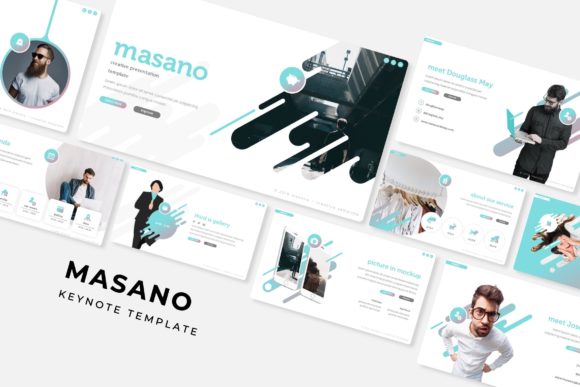
At its core, the Masano Keynote Template is a collection of 150 slides spread across five separate templates, each with its own color variation. That means you get five complete presentation sets, each with 30 slides tailored to a specific color scheme. So whether you are working on something that needs a calm, professional blue tone or something more energetic like a warm orange or red, you have a ready-made foundation. The slides include handcrafted infographics, section breaks, gallery layouts, portfolio pages, and resizable graphics. Everything is built on master slides, which means you can make changes to one place and have it ripple through the entire presentation. The picture placeholders work with drag and drop, and the illustrations are pixel-perfect, so nothing looks stretched or blurry.
It comes as five separate PPTX files, all in widescreen format, and includes a readme file with details on the free fonts used, plus download links. The photographs you see in previews are not included, but that is standard across template packs and honestly, you probably want to use your own images anyway.
Entrepreneurs Pitching to Investors or Clients
If you are an entrepreneur, you probably spend a fair amount of time standing in front of people trying to explain why your idea matters. Investors have seen hundreds of decks. They notice when slides look slapped together. The Masano Keynote Template gives you a professional structure so you can focus on your story instead of worrying about alignment or font consistency. The section break slides help you transition between topics like market analysis, product overview, and financial projections. The infographics are useful for showing data without making people stare at a spreadsheet. And because there are five color variations, you can choose one that matches your brand or industry expectations. A fintech startup might go with a clean blue, while a creative agency might prefer something bolder.
Educators and Trainers Who Need Clear Visuals
Teaching adults is different from teaching kids. Adults need clarity, structure, and relevance. If you are running a workshop, a corporate training session, or even an online course, the Masano Keynote Template helps you organize information in a way that does not overwhelm your audience. The handcrafted infographics are particularly useful here. Instead of listing bullet points about a process, you can show a visual flow. Instead of talking abstractly about stages, you can use section breaks to signal when you are moving to a new topic. The gallery slides also work well if you want to show examples, case studies, or before-and-after scenarios. And because the template is built on master slides, you can tweak the entire look to match your organization's branding without editing each slide individually.
Freelancers and Creatives Building Portfolios
If you are a freelancer, photographer, designer, or content creator, your portfolio is often the first thing potential clients see. A portfolio slide deck needs to feel curated, not cluttered. The Masano Keynote Template includes dedicated portfolio and gallery slides that let you put your work front and center without fighting the layout. The picture placeholders are drag and drop, so you can swap in your own images quickly. The pixel-perfect illustrations mean that even if you resize a graphic, it stays sharp. You can also customize the color scheme to match your personal brand. Since there are five complete templates, you could even create different versions of your portfolio for different types of clients, like a more conservative version for corporate clients and a more vibrant one for creative gigs.
Marketers Creating Campaign Decks or Reports
Marketers live in presentations. Whether you are presenting a campaign strategy, a quarterly review, or a social media audit, you need slides that are easy to digest. The Masano Keynote Template works well here because it balances visual appeal with readability. The infographics let you present engagement metrics, conversion rates, or audience demographics in a way that your stakeholders can actually understand. The section break slides help you separate different parts of the report, like strategy, execution, and results. And since the templates are resizable and editable, you can repurpose the same deck for different clients or campaigns by swapping out colors and images. The five premade colors also give you flexibility if you need to align with a client's brand guidelines without starting from scratch.
Small Business Owners Who Wear Many Hats
Running a small business means you are often the CEO, marketer, salesperson, and designer all at once. You do not have time to learn PowerPoint design tricks. You need something that works out of the box. The Masano Keynote Template is straightforward. You open the file, replace the placeholder text with your own, drag your images into the picture placeholders, and you are mostly done. The master slides handle consistency, so you do not accidentally end up with different fonts on different slides. The 30 slides in each template cover a wide range of needs, from cover slides and about pages to pricing tables and team introductions. Whether you are preparing a pitch for a local investor, a presentation for a community event, or a product demo for a potential partner, you have a slide for that.
Hobbyists and Everyday Users Sharing Personal Projects
Not every presentation is for work. Some people just want to share something they care about: a travel photo series, a family history project, a community initiative, or a personal blog update. The Masano Keynote Template makes it easy to create something that looks thoughtful and intentional. The gallery slides are great for showcasing photos. The infographics can be used to tell a story, like how a project evolved over time or how different elements connect. The five color themes let you match the mood of your content. A travel deck might use warm earthy tones. A community project might use bright, inviting colors. And because the templates are widescreen, they look good on modern screens and projectors.
Connecting Features to Real Outcomes
It is easy to list features, but the real value of the Masano Keynote Template is in what those features let you do differently. The fact that there are 150 total slides across five templates means you are not stuck with one look. If you are working on multiple projects, you can use different variations without having to redesign everything from scratch. The handcrafted infographics save you from drawing your own diagrams, which takes time and often looks amateurish when done quickly. The section break slides help with pacing. When you move from one part of a presentation to another, a visual break signals to the audience that a shift is happening. That small thing improves comprehension a lot.
The resizable and editable graphics mean you are not locked into a fixed layout. If you need to shrink an icon or stretch a shape to fit your content, you can do it without breaking the design. The picture placeholders are especially useful if you are not comfortable cropping and positioning images manually. You just drop your photo into the placeholder, and it fits perfectly. The master slides foundation means you can change the color scheme, font, or background across all slides in seconds. That is a huge time saver if you are iterating on a deck or if you need to adapt it for a different audience.
What to Consider Before Using the Masano Keynote Template
Like any template, the Masano Keynote Template works best when you treat it as a starting point, not a final product. The photographs in the preview are for illustration only, so you will need your own images. That is actually a good thing, because using your own photos makes the presentation feel authentic rather than generic. The free fonts are included with download links, so you will need to install them if they are not already on your system. That takes about two minutes.
The template is designed for PowerPoint (PPTX files), so if you primarily use Google Slides or Keynote, you may need to do some conversion. That usually works fine, but some advanced formatting might shift slightly. It is worth opening the file in your intended software early to check. Also, while the five color variations cover a broad range, they are fixed palettes. If your brand color is a very specific shade, you may need to do some manual tweaking. But because the template is editable, that is usually doable with a few clicks.
The 30 slides per template cover most common presentation sections, but if you need something very specific, like a complex timeline or a custom diagram, you might need to combine elements across slides or add your own. That is not a limitation, it is just realistic. No template can anticipate every single need, but this one gives you a strong foundation to build on.
For creators, entrepreneurs, educators, freelancers, marketers, small business owners, and everyday users, the Masano Keynote Template offers a practical way to produce presentations that look professional without requiring design skills. It saves time, reduces frustration, and lets you focus on what you actually want to say. That is the whole point of a good template.